
NightBeacon CMD
The SOC platform we built to run our own. Now you choose who runs it.
The SOC platform we built to run our own. Now you choose who runs it.







Join forces with a mission-obsessed cybersecurity company dedicated to making the world a safer place
 About Us
 Leadership
 Careers
 The Attackers-Mindset
 Threat-Informed Detections
 News & Press Releases

Log-in to your portal account to get started.

Adam Paulina
Security teams are conditioned to be suspicious of macros, ZIP archives, and executable attachments. Image files, on the other hand, tend to fly under the radar. In recent investigations, Binary Defense researchers observed multiple phishing campaigns abusing SVG files. Weaponizing a format that most users and many security tools still treat as harmless. Much like other modern phishing techniques, these campaigns rely less on obvious malware and more on abusing legitimate functionality in unexpected ways. SVGs are a prime example.
At a glance, SVGs look like standard image files. In reality, they’re XML-based text files that are rendered dynamically by browsers and email clients. This design allows SVGs to support animation and interactivity, but it also allows embedded JavaScript.In legitimate use cases, this functionality is rarely needed. In malicious hands, however, it becomes a powerful delivery mechanism.
An SVG file can:
<script> tags that execute JavaScriptxlink:hrefBecause the file still ends in .svg, it often bypasses attachment filters and earns a false sense of trust from users.
A clean SVG file is typically readable XML defining shapes, colors, and coordinates. For example, a simple SVG may include a shape and a small script used for animation or interaction.In malicious samples, researchers observed:
<script> tagsThis malicious logic often triggers only after user interaction, such as clicking on the image, further reducing the chance of automated detection.
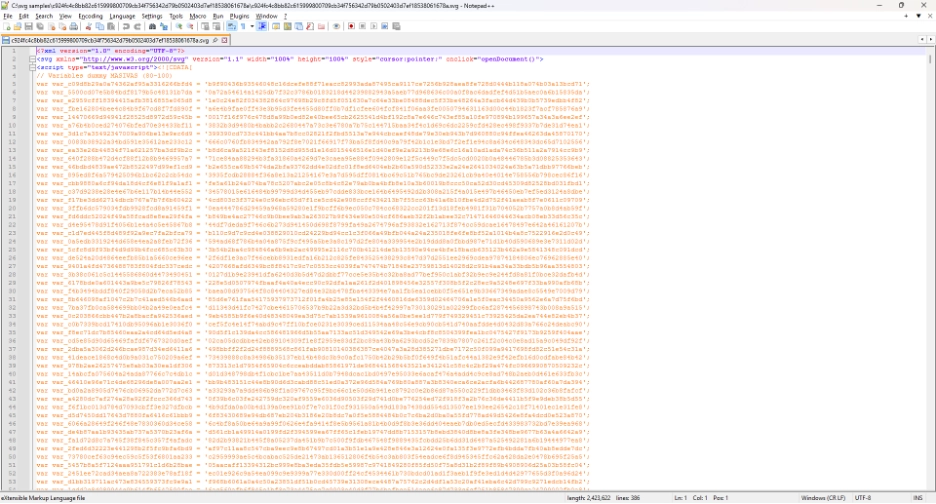
SVG phishing highlights several detection gaps defenders continue to struggle with:
As a result, defenders often have little visibility until a user interacts with the file.
To better understand and identify malicious SVGs, Binary Defense researchers developed a lightweight Python tool designed to flag suspicious characteristics rather than relying on signatures alone.
The tool performs three primary checks:
SVGs are plaintext XML files and should exhibit relatively low entropy. High entropy can indicate encoded or encrypted content, often a sign of embedded JavaScript or payloads.
The tool searches for <script> tags, which enable JavaScript execution. While not inherently malicious, script tags in SVGs are uncommon in legitimate use and should raise immediate suspicion.
Some SVGs avoid embedding JavaScript directly and instead reference external scripts using attributes like xlink:href. This technique allows attackers to keep the SVG itself relatively clean while loading malicious code at runtime.
Individually, these indicators may produce false positives. Combined, they provide strong signals that an SVG warrants deeper inspection.
Since direct detection of malicious SVG content is often impractical, researchers shifted focus to behavioral hunting, specifically around how SVGs are delivered and executed.Recent campaigns primarily relied on email-based delivery, making Microsoft Outlook a common execution vector. Based on observed techniques, several high-signal hunting approaches emerged:
.svg files where Outlook.exe is the initiating or parent processOne notable caveat: legitimate Outlook behavior can generate SVG files in local cache directories, so contextual analysis is critical to avoid false positives.
Below are example hunting queries defenders can use to identify potentially malicious SVG activity across common security platforms. These are intended as starting points, not drop‑in detections, and should be tuned to your environment.
Network connections to SVG files with Outlook as the initiating or parent process
DeviceNetworkEvents| where InitiatingProcessParentFileName contains "outlook.exe"| where RemoteUrl endswith ".svg"DeviceNetworkEvents| where InitiatingProcessFileName contains "outlook.exe"| where RemoteUrl endswith ".svg"SVG URLs that redirect to additional URLs
UrlClickEvents| where todynamic(UrlChain)[0] endswith ".svg"| where array_length(todynamic(UrlChain)) > 1SVG file creation from Outlook activity
DeviceFileEvents| where InitiatingProcessFileName contains "outlook.exe"| where FileName endswith ".svg"| project-reorder TimeGenerated, DeviceName, FileName, SHA256, FileOriginUrlSVG files written to disk with Outlook as the parent process
#event_simpleName="*FileWritten"| FileName=/.*\\.svg$/i| ContextBaseFileName=/outlook\\.exe/iThis can help surface SVG attachments saved from phishing emails, especially when combined with execution or network telemetry.
Outbound connections to SVG resources originating from Outlook
Url EndsWith ".svg" and SrcProcParentName ContainsCIS "outlook.exe"Url EndsWith ".svg" and SrcProcName ContainsCIS "outlook.exe"SVG file creation tied to Outlook execution
TgtFilePath endswith ".svg" and SrcProcName contains "outlook.exe"As with all behavioral detections, analysts should validate surrounding context to distinguish malicious activity from legitimate email rendering and caching behavior.
https://news.sophos.com/en-us/2025/02/05/svg-phishing/
https://www.cloudflare.com/threat-intelligence/research/report/svgs-the-hackers-canvas/
https://www.ibm.com/think/x-force/weaponized-svgs-inside-a-global-phishing-campaign-targeting-financial-institutions