
NightBeacon CMD
The SOC platform we built to run our own. Now you choose who runs it.
The SOC platform we built to run our own. Now you choose who runs it.







Join forces with a mission-obsessed cybersecurity company dedicated to making the world a safer place
 About Us
 Leadership
 Careers
 The Attackers-Mindset
 Threat-Informed Detections
 News & Press Releases

Log-in to your portal account to get started.

Nolan Warner
Adversaries are always searching for ways to neutralize the very tools designed to stop them. As Endpoint Detection and Response (EDR) platforms and Endpoint Protection Platforms (EPP) like Microsoft Defender continue to evolve, attackers are experimenting with new methods to slip past defenses. One such example is DefendNot, a proof-of-concept tool that doesn’t break Defender directly but instead convinces Windows to disable its own protections.
Rather than tampering with Defender processes or registry keys, DefendNot takes a different approach by registering a fake antivirus through the Windows Security Center (WSC) COM interface. Because Defender is built to step aside when third-party antivirus software is present, this spoofed registration triggers Windows’ own conflict resolution logic. The effect is that Defender disables itself, leaving the endpoint vulnerable, without generating the usual indicators of tampering.
This write-up unpacks how DefendNot operates, where defenders can still find traces of it, and the steps security teams can take to remediate attacks.
As defensive technologies harden, attackers have developed techniques aimed squarely at taking the eyes and ears away from defenders. These tools, known collectively as EDR Killers, are designed not to deliver the final blow themselves, but to pave the way by silencing the systems that would normally sound the alarm.
We at Binary Defense ARC Labs have tracked this trend closely. In previous research, we analyzed KillerUltra, a malware family observed in ransomware campaigns that aggressively target endpoint security products. KillerUltra and similar tools use brute-force methods that either:
The intent is always the same, blind the defender and buy time for follow-on activity like data theft or ransomware deployment. These tactics represent a direct, heavy-handed assault on endpoint defenses, and our analysis showed just how disruptive they can be when combined with a broader intrusion campaign.
Where DefendNot differs is in subtlety. Rather than killing processes or tearing apart Defender’s internals, it tricks Windows into voluntarily shutting down its own protections. It’s less about force and more about deception, another evolutionary step in the EDRKiller playbook. While KillerUltra highlights the loud ways adversaries attack endpoint agents, DefendNot shows that attackers are equally willing to exploit the quiet ones by abusing native system logic to create blind spots without leaving behind the obvious fingerprints of tampering.
Both approaches underscore the same reality, EDR Killers are evolving into a diverse category of tools, and defenders must be prepared for both the blunt and the stealthy.
At the core of DefendNot’s technique is the Windows Security Center (WSC), a native Windows component responsible for managing security products like antivirus and EDR solutions. WSC exists to prevent conflicts: when it detects a third-party antivirus, it automatically disables most of Windows Defender’s responsibilities and hands control to the new product.
DefendNot abuses this behavior in a way that is different from most other EDRKillers. Instead of unhooking user-mode monitoring functions, killing services, or tampering with critical Defender files, DefendNot takes a quiet path. It registers itself as a fake antivirus inside WSC, convincing Windows to do the work of disabling Defender on its behalf.
To make this possible, DefendNot writes registry entries under WSC-managed paths. These paths are normally used by Windows to track legitimate antivirus products. Once those keys are in place, WSC accepts the registration as valid and replaces the Defender entry with the spoofed antivirus. To the user and to Defender itself, it looks like some form of protection is still active, but in reality, endpoint visibility has been silently degraded.
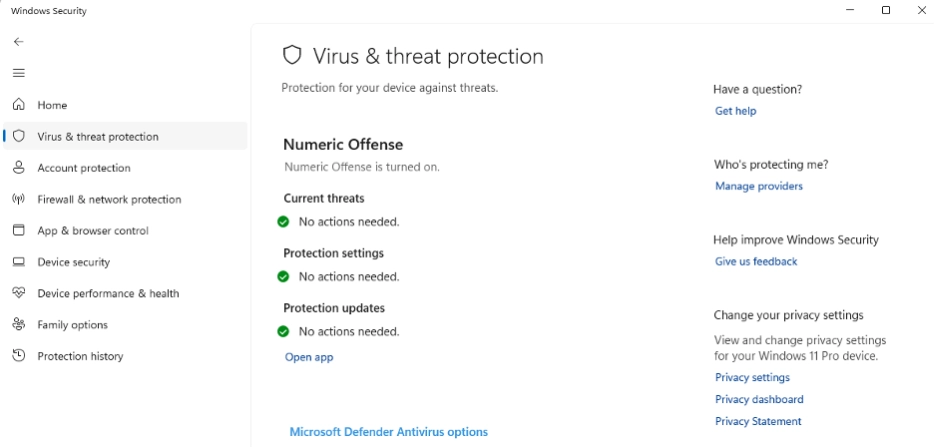
When executed, DefendNot makes an API call to the WSC COM object to complete the spoofed registration. The fake antivirus entry includes a fabricated product name and GUID. With this in place, Windows Defender executes its built-in conflict logic and deactivates itself. This technique is stealthy and effective, impacting Defender’s logging and telemetry in a way that allows DefendNot to avoid many of the traditional detection mechanisms. However, the tool does not leave systems completely blind and there are still residual artifacts defenders can hunt for.
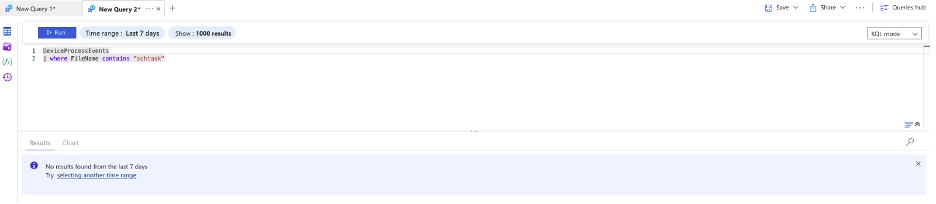
After disabling Defender, DefendNot moves to establish persistence. Instead of creating a scheduled task through common utilities like schtasks.exe, it writes directly to the TaskCache registry hive.
This approach helps it avoid the normal logging associated with scheduled task creation. By default, DefendNot names these scheduled tasks consistently. Attackers would need to modify the tool itself to change that naming scheme. This predictable behavior creates a practical detection opportunity, especially against less sophisticated adversaries who use the proof-of-concept without modification.
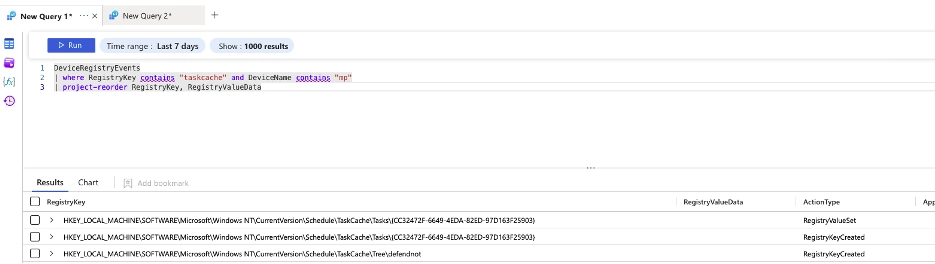
Although Microsoft Defender for Endpoint’s logging is degraded once DefendNot is active, defenders can still detect its activity. The tool creates new entries under both the antivirus provider and AMSI provider registry paths. Each of these contains a GUID that may appear arbitrary, but these GUIDs represent the spoofed antivirus registered by DefendNot alongside the legitimate Defender entry.
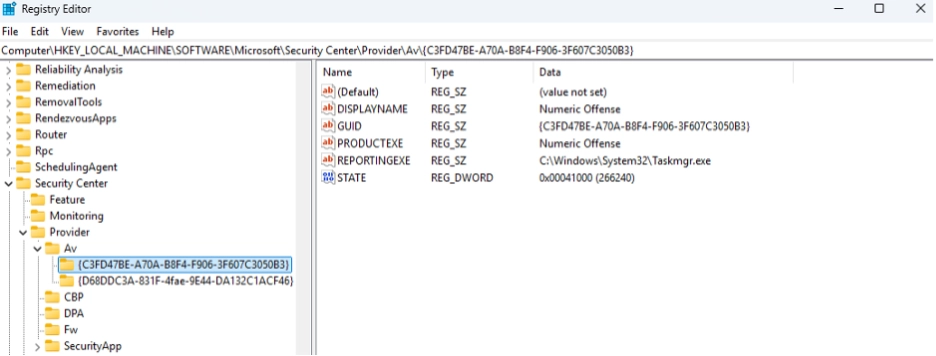
We observed that the GUIDs created by DefendNot are system-specific. They vary across hosts, and the values differ between domain-joined and non-domain-joined systems. This behavior is different from legitimate antivirus products, which use consistent, vendor-specific GUIDs. The registry entries also store metadata pointing to the DLL responsible for handling antivirus or AMSI functions, giving defenders another way to confirm tampering.
Because this spoofing leverages Windows Security Center’s standard provider mechanism, any attempt to replicate DefendNot’s approach will produce similar registry entries. Monitoring for unknown or unsigned GUIDs under antivirus or AMSI provider paths is therefore a reliable detection strategy. In practice, defenders investigating these modifications should focus on the “InProcServer32” registry key, which usually contains the path to the DLL associated with the suspicious service.
Monitoring for registry modification and creation events under the following keys can provide strong indicators of DefendNot’s presence:
We've published detection and threat hunting criteria to help security teams identify DefendNot activity. These are available in the ARC Labs GitHub repository.
Remediating DefendNot is relatively straightforward when dealing with the original proof-of-concept. Running the following command will disable its effects:
defendnot-loader -disable
If it is a variant or mimic that uses the same technique, manual remediation is recommended. This involves:
Once these artifacts are removed, restart the machine and confirm Defender’s operational status by running:
Get-MpComputerStatus
This validation ensures that spoofed antivirus registrations have been cleared and that Microsoft Defender is once again actively protecting the system.
DefendNot demonstrates how attackers continue to innovate by turning security logic against itself. Instead of disabling Microsoft Defender through brute force techniques, it convinces Windows that another antivirus product is already installed and trusted. This approach highlights how native system behaviors can be manipulated to quietly remove visibility and create blind spots for defenders.
Although the proof-of-concept is stealthy, it is not invisible. Registry artifacts, spoofed GUIDs, and TaskCache persistence all provide defenders with opportunities to identify and respond to this technique. Security teams that monitor for these signals and validate the integrity of registered antivirus providers can detect DefendNot activity even in environments where Defender’s own logging is impaired.
The broader lesson is that endpoint defense cannot rely on a single control. Attackers are increasingly building tools designed to blind security products, whether through aggressive EDRKillers like KillerUltra or deceptive techniques like DefendNot. Continuous threat hunting, layered detection engineering, and active monitoring of system-level behaviors are essential for catching these evasive methods before they can be used to enable more destructive attacks such as ransomware.
We at Binary Defense ARC Labs will continue to analyze and publish findings on tools like DefendNot to give defenders the visibility and context they need to stay ahead of attackers.