
NightBeacon CMD
The SOC platform we built to run our own. Now you choose who runs it.
The SOC platform we built to run our own. Now you choose who runs it.







Join forces with a mission-obsessed cybersecurity company dedicated to making the world a safer place
 About Us
 Leadership
 Careers
 The Attackers-Mindset
 Threat-Informed Detections
 News & Press Releases

Log-in to your portal account to get started.
How a proof-of-concept tool quietly disables core security services by exploiting Windows ACL behavior.

Adam Paulina
Security teams are conditioned to look for malware, persistence mechanisms, or suspicious command-line activity. What we do not expect is a core Windows DLL suddenly becoming inaccessible to security services.
Recently, Binary Defense researchers analyzed a proof-of-concept tool called defender-acl-blocker, which demonstrates a subtle but highly effective way of crippling Windows Defender without dropping malware or using exploits.
Instead, the tool abuses legitimate Windows Access Control List (ACL) functionality, and its effects only become visible after a reboot, making detection even harder.
kernel32.dll for targeted service identities.kernel32.dll, it can’t load, and fails to start.DeviceProcessEvents, DeviceFileEvents, etc.). We did observe Windows Security Event IDs 4670 (high fidelity) and 4663 (lower fidelity) as useful pivots for detection.Most Windows executables (and services) depend on core libraries like kernel32.dll. If Windows prevents a service from reading that DLL, the service’s dependency chain breaks and the service won’t start. The PoC takes advantage of that dependency reality, not a novel exploit in the traditional sense.
With administrator privileges, the tool changes the Access Control List (ACL) on kernel32.dll to introduce Deny entries for specific service identities. That shifts the system from “service can read the DLL” to “service is blocked from reading the DLL,” which prevents the service from starting.
An ACL is made up of Access Control Entries (ACEs) that Allow or Deny a user/group/process access to an object (file, registry key, etc.). A Deny ACE is powerful, especially when applied to a foundational library and aimed at a service identity, because it can override otherwise valid permissions.
In lab testing, Binary Defense researchers confirmed that the tool requires admin access in order to work, and that it runs near silently without generating any events in the typical DeviceEvents, DeviceProcessEvents, DeviceFileEvents tables. Additionally, changes are not immediately obvious. Defender still functions immediately after running the tool, the ACL only updates after a reboot.
In its default operation the tool runs without requiring command line options, and the proof of concept ships with a garbler so it is possible to make stealth versions with random hashes. As a result, filenames and hashes are an unreliable way to detect this tool.
In the lab it was determined that the defender-acl-blocker tool is not entirely silent, it does trigger a couple rare security events, particularly Event ID 4670 for "Permissions on an object were changed". Researchers were able to write a high fidelity detection using this event for the addition of deny ACLs to kernel32.dll. Unfortunately, the event data only provides the SID of the affected services rather than the service names - however it is possible to calculate the SID if the service name is known. The SID is derived from the SHA1 hash of the UTF16 representation of the uppercase service name, which means since the POC's targeted services are known it's possible to calculate those SIDs in advance to create a lookup table of service names -> SIDs.
With a bit of effort it was possible to create this lookup table on the fly via KQL, where a user can provide a list of service names of interest in an array at the top, and the query will take care of converting these to their SIDs to create the lookup table which is then used to join with the SecurityEvent table and provide the service name for any of the SIDs where applicable.
Due to KQL limitations, this query required several workarounds. KQL doesn't directly provide a function for calculating SIDs from service names, but it does have a SHA1 hash function, hash_sha1() which takes in a string and outputs its hash.
Unfortunately, directly inputting the service name from the table into hash_sha1() doesn't work, it outputs the wrong hash. The reason for this is that KQL stores strings as UTF8, but the SID is derived from the SHA1 hash of the UTF16 representation of the service name. Unfortunately, KQL has no way to represent strings as anything other than UTF8, and it has no functions for converting a string's encoding between Unicode types.
Fortunately, the only difference between UTF8 and UTF16 for characters that appear in both is that UTF16 stores characters in two bytes instead of one, which means a 0x00 byte is either prepended or appended to every character byte depending on the endianness. This means it's actually possible to store a UTF16 string as a UTF8 string if you insert null bytes before or after every character. According to this blog, the UTF16 service name string must be little endian, which means the 0x00 bytes need to be appended after every character.
That leads to the next KQL workaround: The fastest way to insert 0x00 bytes after every character would be to do a find-replace using some regex, where the find regex identifies every character and the replace regex inserts a 0x00 byte after it. KQL comes with a helpful regex function for doing exactly that, replace_regex().
Unfortunately, replace_regex() identifies capturing groups using the syntax "\X" where X is the number of the capturing group, i.e. capturing group 1 is "\1". This directly conflicts with the regex null character, which is \0. As a result, it's not possible to use replace_regex() to automatically add a 0x00 byte after every character, and instead a manual replace must be done for every possible character one by one using replace_string().
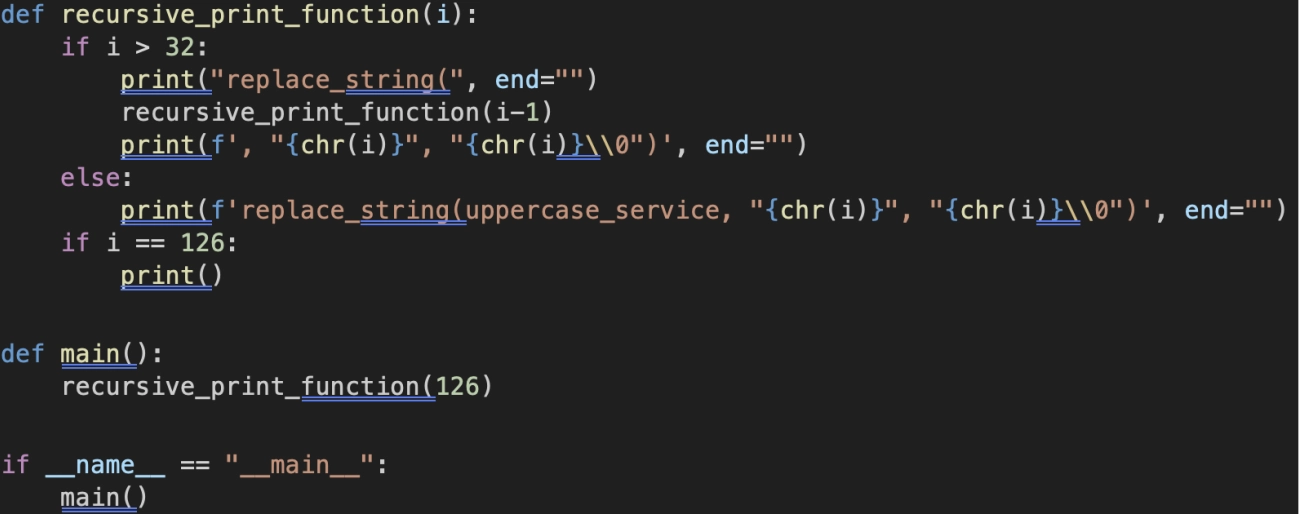
At least it's not necessary to type this up by hand, with a little bit of python the line can be generated automatically:
Script:
Output:
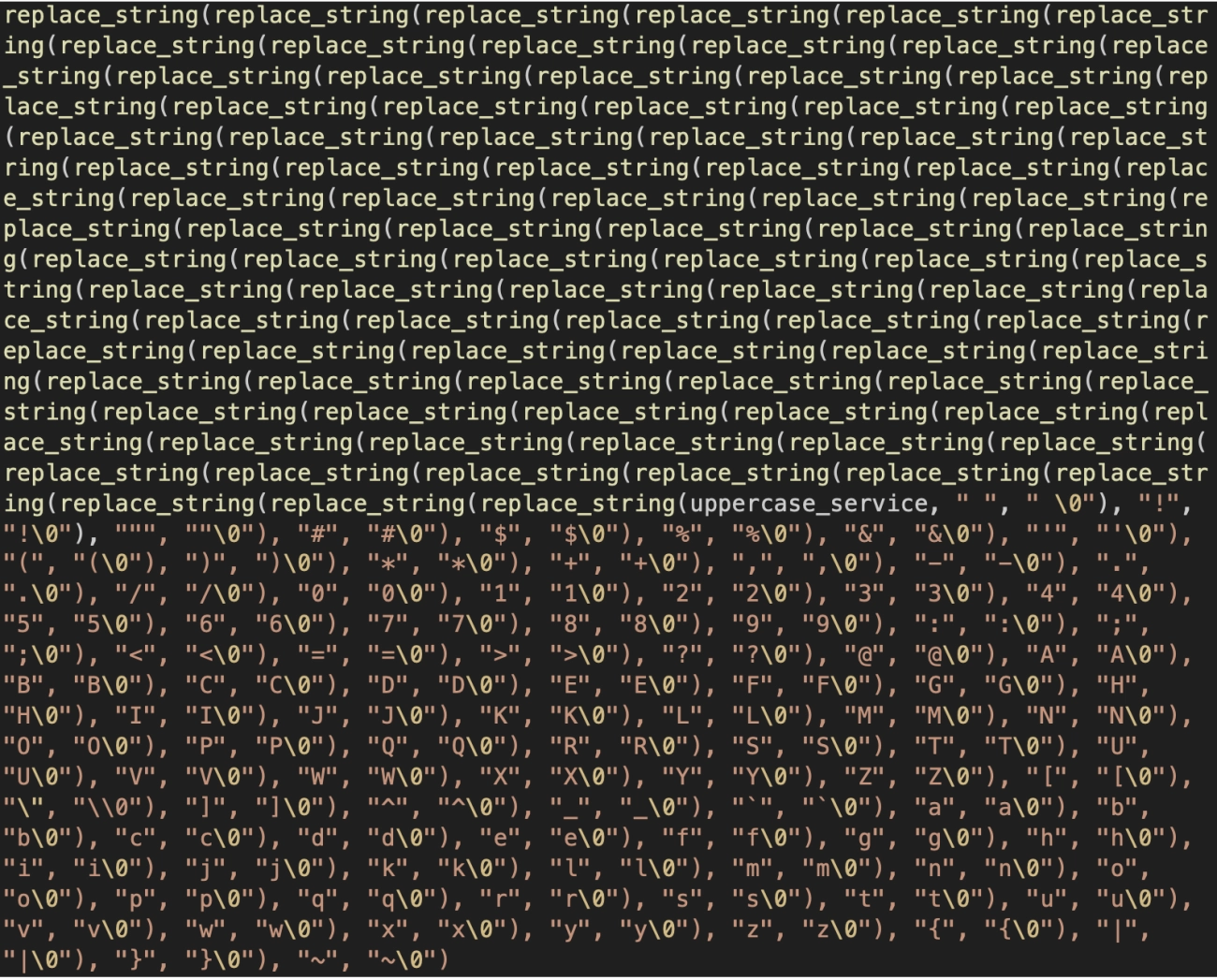
Just need to remove the replace_string() calls for the two slashes that aren't valid service name characters ("\" and "/") and the line is good to go.
After getting the correct hash, it's necessary to split the hash string by character index in order to do the byte reversal required for the SID format. This could be accomplished with either the substring function, or with regex capture groups and the extract() function - by assigning every 8 bytes to a capturing group it's possible to extract them one by one and assign them to different variables, which can then be recombined in a different order using strcat().
The conversion back to decimal was made trivial thanks to the tolong() function, which (though not documented on MSDN) can convert string representations of hex values to decimal if the hex strings start with "0x". With the final decimal values acquired, it's simple to assemble them into the final SID using strcat().
As for the SecurityEvent subquery:
The ACLs themselves use the Security Definition Description Language, or SDDL:
https://learn.microsoft.com/en-us/windows/win32/secauthz/security-descriptor-string-format
https://learn.microsoft.com/en-us/windows/win32/secauthz/ace-strings
Researchers were specifically able to detect Deny ACEs by hunting for DACL entries containing an ACE string that starts with "D". Deny entries are uncommon in general, and are almost unheard of where the ObjectName is "kernel32.dll". False positives are extremely unlikely.
In order to get anything useful out of the ACLs, the SDDL must be parsed by hand using the extract() function. Unfortunately, Sentinel doesn't automatically parse all of the useful data out of these, nor does it provide any native helper functions for parsing SDDL.
Event ID 4670 comes with two service descriptors, a before and after, which allows for detailed analysis of what changes were made. Neither field is natively exposed by Sentinel, instead they are subfields of the "EventData" field, which is in XML format. KQL does have a builtin function for parsing XML called parse_xml(), but in testing the function was not helpful for extracting fields.
Instead of making new fields for each of the extracted subfields, it created one new dynamic field, where each entry in the dynamic was a bit of json with two fields, #text and @name containing the field text and field name respectively. This is not at all useful because it doesn't allow you to access subfields by their name. It's much easier to just extract the necessary fields by hand with the extract() function.
After extracting the two service descriptors, they appear in the following format:
D:P(A;;FA;;;S-1-5-80-956008885-3418522649-1831038044-1853292631-2271478464)(A;;0x1200a9;;;BA)(A;;0x1200a9;;;SY)(A;;0x1200a9;;;BU)(A;;0x1200a9;;;AC)(A;;0x1200a9;;;S-1-15-2-2)
The "D:" at the start means it's a DACL, and then every block of parentheses is a separate entry. Each entry starts with a single character describing its type (i.e. "A" for Allow, "D" for Deny). These are then followed by different flags and potentially SIDs. In order to parse this effectively, the replace() function was used to remove the opening DACL flags and then the split() function was used to turn it into an array of entries by splitting on the delimiter ")(". Converting this back into a string allowed the use of replace() to remove the final closing parenthesis, before converting back to a dynamic.
After the old and new service descriptors are extracted into a more usable format, all kinds of hunts could be done on the information. For this specific hunt, researchers were looking for deny entries being applied to specific services, so it made sense to make every service its own row. This could be done by using mv-expand() to turn the extracted DACL array into several separate rows. Next, filtering for only rows containing "S-1-5-80" ensures that only entries with service SIDs are included.
Now the SID itself and the Allow/Deny type can be extracted using simple regex capturing groups, although the replace() function was used to convert the A/D characters into a more useful Allow/Deny string.
Finally, the actual filtering logic could be implemented; the hunt only returns results where the affected object is kernel32.dll and the type is Deny. This query could be modified to look for other types of permission modifications to other files.
One additional event was seen in the lab, Event ID 4663 for "An attempt was made to access an object". This event indicates that something changed about the object in question, which can indicate that its ACL list was changed. This detection is lower fidelity, and can also trigger for benign changes such as OS updates, but in lab testing it saw a low number of false positives which can be easily excluded. Unlike event 4670, the output of event 4663 is much easier to work with and doesn't require much manual parsing.
If you’re responsible for Windows security operations, here is practical checklist:
Turn on and centralize Security auditing for file permission changes
If you aren’t collecting 4670 events, you won’t see this cleanly.
Hunt for Deny ACEs on critical system DLLs
Today it’s kernel32.dll. The technique can be adapted to other DLLs and services.
Alert on “Deny to service SID” patterns
Specifically, ACEs referencing S-1-5-80-* on files that should never have service-deny rules.
Treat “post-reboot Defender failure” as a suspicious condition
The delayed effect is part of what makes this technique operationally useful to attackers.
Don’t rely on hash-based detections
The included garbler means static IoCs will churn quickly.
We've written up our detection queries and posted them our ARC Labs github repo.